AI Note Taking Apps: Choose for Meetings, Reading, or Research
Compare Granola, Otter, Notion, NotebookLM, and Ancher by what you capture and what you need next: meeting actions, study notes, or a useful draft.
An hour-long call ends, and you need the decision and next steps. Later, you read a report and need to connect its findings to your project. Both activities produce notes. They do not necessarily need the same AI note taking app.
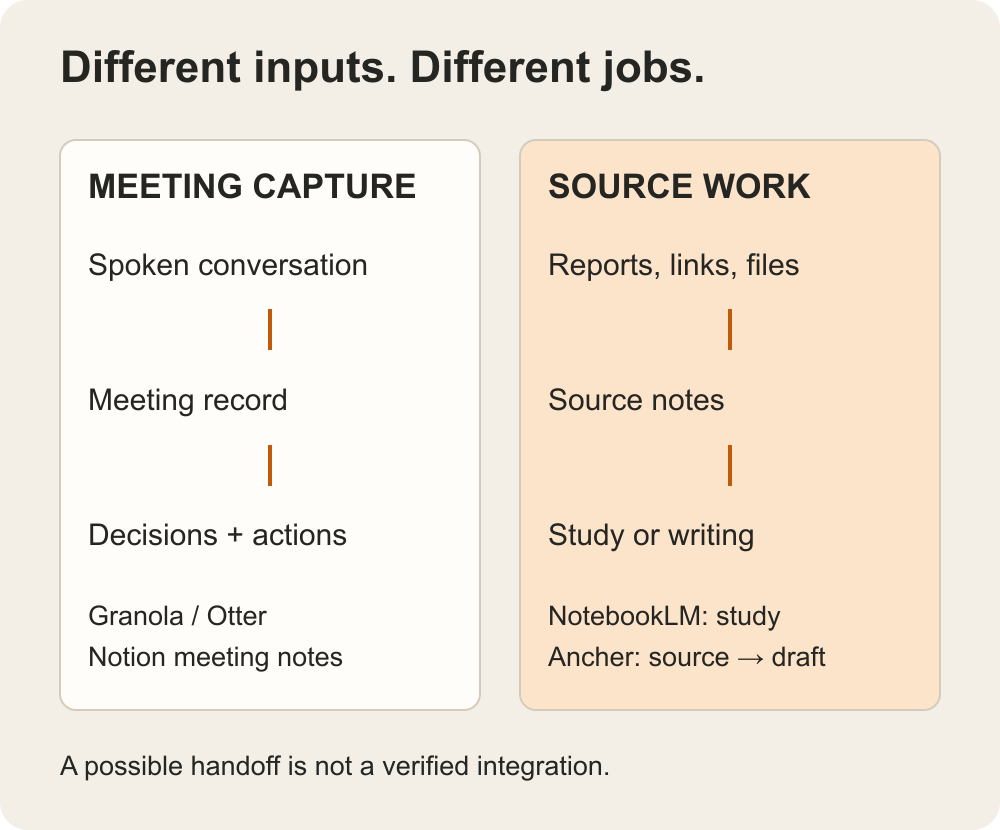
Choose by what you capture first: conversations, notes you write, or sources you read. A meeting assistant is useful when spoken information is the missing record. A research workspace is useful when the material already exists but you need to understand and reuse it.
Our shortlist separates those jobs instead of treating every app with a summary button as a direct substitute.
TL;DR
- Start with Granola or Otter for meeting capture and follow-up.
- Consider Notion when meeting notes should live beside project pages and ongoing work.
- Consider NotebookLM for studying a selected set of sources, or Ancher when saved reading needs to become something you write.
Choose a category before an app
Think about the last note you wished you had. Was it something someone said, a thought you never wrote down, or a detail buried inside saved reading?
| Your missing record | Category to evaluate | Candidates for that task |
|---|---|---|
| What people said and agreed during a call | Meeting capture | Granola, Otter; Notion when the team already works there |
| What selected documents say about a question | Source study | NotebookLM |
| How saved reading supports the next draft | Saved-source writing | Ancher |
This is a fit comparison, not a measured accuracy ranking. The best place to start depends on the material you already have and the result you need next.
Granola and Otter are alternatives to each other for the meeting-capture task. They are adjacent to Ancher’s saved-source writing workflow, not direct replacements for it. NotebookLM and Ancher overlap in working with selected sources, but the useful comparison here is studying those sources versus using them in ongoing writing.
For meetings: Granola, Otter, and Notion
Granola: keep your own notes in the conversation
Granola combines notes you write with meeting context to produce enhanced notes. Its desktop approach uses computer audio without inviting a meeting bot.
That makes it worth considering if you like jotting down the parts that matter while someone else is talking. Your short note “revisit onboarding” can remain a cue for the topic you care about, while the fuller meeting record supplies context.
The important trial is not whether the result looks polished. Check whether it preserves a tentative suggestion as tentative and separates a decision from an idea someone mentioned. Before recording, make sure everyone involved understands and accepts the capture arrangement and follow your organization’s requirements. Bot-free does not mean the conversation is not being captured.
Otter: begin with the spoken record
Otter offers transcription, meeting summaries, and action-item workflows. It describes several capture options, including a meeting agent and bot-free recording on desktop or Chrome. It is inaccurate to reduce the choice to “Granola has no bot; Otter always has one.”
Shortlist Otter when you need to return to what was said, not only a compressed account of the meeting. A user interview, for example, may require checking the wording around a comment before you turn it into a research finding.
Try your actual recording conditions and terminology. Review speaker attribution, proper names, and statements involving dates or quantities. A mistaken transcript can flow into a plausible summary, so correcting only the summary leaves the underlying record unreliable.
Notion: keep meeting context near the project
Notion’s AI meeting notes documentation is the starting point if your team already works in Notion. The appeal is less about adding another destination and more about keeping meeting material alongside the pages where work continues.
A meeting note is useful when a teammate can move from it to the decision, owner, or project it concerns. Check whether your intended workspace and plan support the feature, and inspect who can access the page before using sensitive meeting material.
If your team does not use Notion, adopting an entire workspace just for meeting notes may create more coordination than it removes. Compare the place where your colleagues will actually look for the record.
For reading and research: NotebookLM and Ancher
NotebookLM: understand a bounded set of sources
NotebookLM is worth considering when your question is about material you have selected: a set of course readings, project documents, or research sources. Google’s help page, currently headed Gemini Notebook, describes source uploads, grounded chat with citations, and outputs such as study guides and audio overviews.
For a reading-heavy task, ask a question that requires comparing two sources rather than summarizing one. Then open the cited passages. Do the sources really disagree, or are they discussing different populations, time periods, or conditions?
This tests the work you need from a research assistant. It does not establish how the app would capture a live call, so do not treat that use case as interchangeable with a meeting notetaker.
Ancher: turn collected reading into usable notes and writing
Ancher is our product, and the fit we focus on here is saved information: links, files, videos, and the notes they become. The product workflow connects structured notes and selected collections to new writing.
For example, you might collect a report, an interview transcript you are permitted to use, and an article while preparing a project update. The useful outcome is not three more summaries. It is an update that identifies what changed, shows the evidence, and makes clear what still needs a decision.
Check the saved notes first, then use the relevant collection as context for that update. Verify key claims against the originals before sharing it. If your primary problem is recording live meetings, begin with a meeting-first tool; the workflow described here is about using material after you have captured it.
When two categories belong in the same workflow
Consider a researcher who interviews customers and also reads industry reports. The meeting tool preserves the conversation; the research or writing tool helps work with the approved record alongside other sources. Those jobs can complement each other without either product being the better version of the other.
If you want to carry material between them, first check that you can export the meeting note, that sharing it is permitted, and that the receiving tool accepts the file or text. Then inspect what arrived. This is a handoff to verify, not a claim of a built-in Granola–Ancher integration. Keep the original meeting record available for checking quotations and conditions.
If you need only a call summary and assigned actions, you may not need the second tool at all.
Try one task all the way through
The easiest demo question is “summarize this.” A better evaluation goes through the next action.
- Choose the actual input. Use one permitted meeting or a small source collection. Do not compare a clean vendor demo to your own difficult audio.
- Define the deliverable. For a call, it might be a decision record with owners. For reading, it might be a short evidence-backed recommendation.
- Check the important details. Look for a changed deadline, an unresolved objection, or a qualification that could alter the conclusion.
- Send it where the work happens. Confirm that a colleague—or your future self—can find and understand the result without opening several disconnected systems.
- Try an export. Open it outside the app and check which notes, links, and attachments survived.
Suppose a call ends with “we could ship Friday if testing passes.” A useful record preserves the condition. “Launch Friday” is shorter, but it assigns certainty the speaker did not provide. That is the kind of error your trial should catch.
Also inspect plan limits on the work you actually do: recording duration, source imports, retained history, AI usage, and sharing. A free entry point is not evidence that your whole workflow will remain free. Check current terms before moving an archive or paying for a year.
Which app should you try first?
Return to the missing note. If it was spoken during a call, compare Granola and Otter using a real conversation; include Notion when it is already where your team works. If the information is inside sources you have saved, start with NotebookLM for source study or Ancher for turning that reading into a draft.
You may need two tools, but you do not need two copies of every piece of information. Choose a clear home for the finished note and a reliable way to get back to its source. The app earns its place when the next action becomes easier—not merely when the note becomes longer.
Ancher
Give your saved reading a next step
Bring the material for your next update into Ancher and work from the sources you chose.
Try AncherFAQ
Frequently Asked Questions
Do all AI note taking apps record meetings?
No. Some focus on capturing conversations; others help you work with notes or sources that already exist. Choose the input you need to handle before comparing summaries or writing features.
Can I rely on an AI-generated action list?
Review it before sharing. Check who accepted an action, whether a deadline was firm or conditional, and whether a suggestion was mistaken for a decision. Keep a way to return to the meeting record.
Can a free plan cover my workflow?
Possibly, but verify the current limits on recording, retained history, imports, AI usage, and sharing. Test the full task rather than assuming a free sign-up includes every feature you need.