AI Knowledge Management: How It Works and Where to Start
Learn how AI knowledge management connects sources to useful answers, where it can fail, and how to evaluate it with one practical research task.

You ask a simple question: why did the team choose this approach? The answer is somewhere in a proposal, a meeting note, and an article someone shared. Finding all three takes longer than reading them.
TL;DR
AI knowledge management uses artificial intelligence to organize, retrieve, and work with stored information. Start with one question and a small set of current sources. Check whether the answer finds the right evidence, respects corrections, and admits gaps. A fluent answer alone does not make a reliable knowledge system.
That distinction matters whether you are managing your own research or evaluating a knowledge system for a team. A fluent answer is useful only if it reflects the right material.
What does AI change about knowledge management?
Knowledge management connects information to the people and tasks that need it. A folder, wiki, or shared drive handles part of that job. Someone still needs to choose what belongs there, keep it current, and help others use it.
AI can assist with several of those activities:
- Understanding: condense a long source into an initial summary.
- Organization: suggest labels or identify related material.
- Retrieval: find passages relevant to a question, even when the wording differs.
- Creation: use selected sources as context for a draft or explanation.
These are different capabilities. An app that summarizes a PDF does not necessarily search an entire company wiki. A search tool that locates documents does not necessarily produce reliable summaries. Decide which part of the work is slow before choosing the system.
For example, a support team may need to find approved answers to customer questions. Salesforce’s overview describes AI knowledge management in that service context. An independent researcher might instead need to connect saved reading to a report. Both involve knowledge, but their requirements are not interchangeable.
How does a source-grounded answer work?
A common approach is retrieval-augmented generation, or RAG. The system retrieves relevant information from a connected collection and supplies it as context for a model’s response. AWS explains this distinction: retrieval adds external information to the generation process rather than requiring that information to be incorporated through retraining.
In practical terms, there are three places to inspect:
| Stage | What happens | What you should check |
|---|---|---|
| Source selection | The system searches accessible material | Is the correct, current document available? |
| Retrieval | Relevant passages are selected | Did it find the exception as well as the general rule? |
| Answer generation | A response is written from that context | Does each important claim follow from the evidence? |
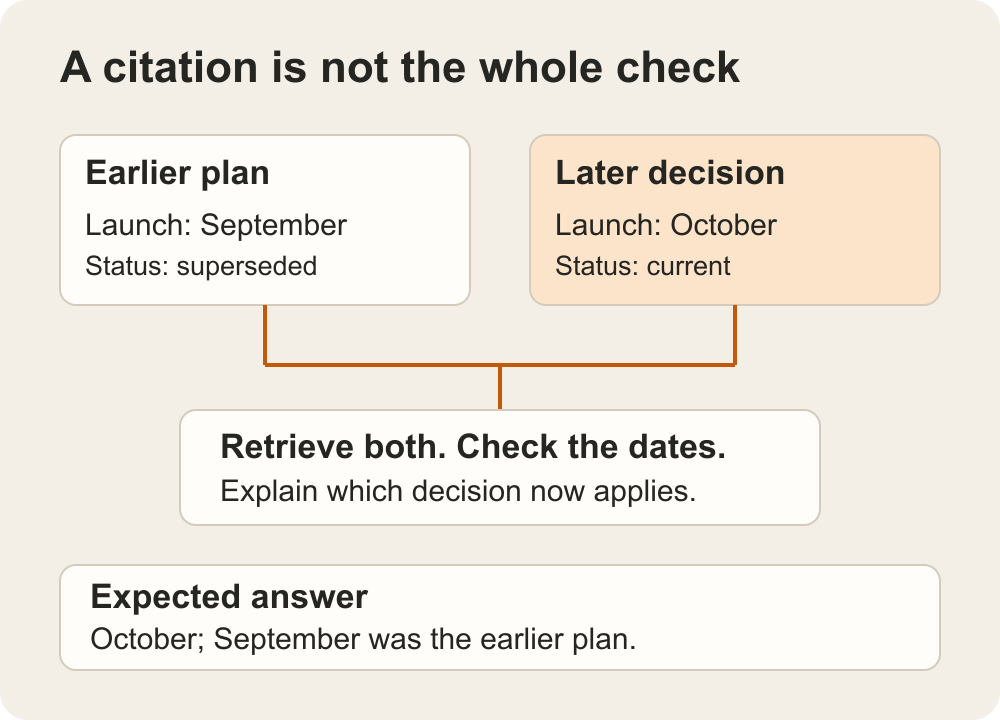
Suppose a project note says a launch is planned for September, but a later decision moves it to October. The system might find both documents. That does not by itself mean it will recognize which one supersedes the other.
A useful response would identify the later decision and preserve the earlier plan as historical context. A confident September answer would still be wrong. Adding more documents without clarifying their status can make that problem harder, not easier.
RAG also is not a universal description of every AI knowledge product. Ask vendors how their own retrieval, source selection, and access controls work rather than inferring the architecture from an AI label.
Personal knowledge and team knowledge need different systems
For personal work, start with the practical friction: saving sources, remembering why they matter, and returning to them when writing. An AI second brain is one way of approaching that personal workflow.
Team knowledge adds a different set of questions. Who owns the answer? Who may see the source? What happens when a document is withdrawn? If two departments disagree, which policy governs?
| Your situation | Prioritize | Do not mistake it for |
|---|---|---|
| Personal reading and writing | Easy capture, retrieval, reusable context | An authoritative company policy system |
| Shared project research | Source ownership, collaboration, decision history | A guarantee that everyone agrees |
| Internal policy or customer support | Permissions, approved content, updates, escalation | A generic chat interface over every file |
A personal app can be useful without meeting enterprise governance needs. Equally, a large enterprise platform may be unnecessary if your problem is finding five articles for a newsletter. Compare products within the job you actually need done.
A practical example: turn research into a decision brief
Imagine you are preparing a short brief on whether to change your onboarding process. You have interview notes, a current process document, and external research. The goal is a recommendation that separates observed problems from ideas worth testing.
Start with a question the sources can answer
“Improve onboarding” is too broad. Try “Where do new users lose the information they need to finish setup?” Then collect only the material relevant to that question, with permission to use it.
Keep source types visible. An interview is evidence of what that participant said; it is not proof of how all users behave. An outside article may suggest an approach without establishing that it fits your product.
Build a small working collection
Ancher’s product workflow includes structured notes from saved sources and collections that supply context for new work. That makes it a candidate for this personal research-to-writing task, rather than evidence that it is a replacement for a governed company knowledge base.
For the example, group the relevant notes and request a brief with three parts: observed friction, supporting sources, and unanswered questions. Ask the assistant to keep source statements separate from its suggestions.
This is a task to try, not a claim that a particular output has been tested. Open the original material beside the draft. If a proposed change relies on an assumption that no source supports, label it as a hypothesis or remove it.
Judge the result, not just the summary
A useful brief should let another person understand the recommendation and inspect its basis. The reader should be able to distinguish “three interview participants mentioned this problem” from “this is the biggest problem for our whole user base.”
When the sources disagree, preserve the disagreement. When there is no evidence, preserve the gap. The brief is finished when it supports an honest decision about what to do next—not when every section contains a confident answer.
What should you check before adopting a tool?
Use a small, permitted sample containing both straightforward material and one known complication. An outdated document, a correction, or a question with no answer in the collection can be more revealing than an easy summary request.
- Find a known fact. Can you recover the source and its surrounding context?
- Try a conflict. Does the response show the competing evidence or silently choose one version?
- Ask an unanswerable question. Notice whether it admits the gap or fills it with a plausible story.
- Check access and exit. Confirm who can view the material and whether you can export the notes you need.
Keep a short record of the original question, answer, source, and correction. This gives you something concrete to compare across tools without pretending a tiny trial is a benchmark.
Start with the answer you need to defend
The question at the beginning—why did we choose this approach?—does not require a bigger archive. It requires a clear path from a decision to the material that supports it.
Start there. Choose one recurring question, assemble the relevant sources, and see whether AI reduces the work of finding and checking the answer. If it only produces a smoother paragraph, you have improved presentation. If it helps you recover the evidence and make a better-supported decision, you have improved the knowledge workflow.
Ancher
Bring the evidence into your next brief
Collect the sources for one question, then use them as context for a draft you can check.
Try AncherFAQ
Frequently Asked Questions
Is AI knowledge management the same as a chatbot?
No. A chatbot is an interface. Knowledge management also involves selecting sources, maintaining them, controlling access, and making information useful for a task. A chat interface can be part of that system without solving those other responsibilities.
Does RAG prevent incorrect answers?
No. Retrieval can supply relevant material, but the system may retrieve the wrong passage, miss a correction, or interpret the evidence incorrectly. Check important claims against the original source.
Where should a small team start?
Start with one recurring question and a small set of permitted, current sources. Compare the quality and traceability of the answer before connecting a larger archive. Add access and ownership checks before sharing the system more widely.